
The earliest medical alert base units were built like very good speakerphones. They plugged into the telephone jack, and when the help button was pressed they seized the home phone line and dialled the monitoring centre over the same copper pair the household used to call the grandchildren. No phone line meant no service. For the first few decades of this industry, that single requirement decided who could have protection at all.
That requirement is gone. Most current systems in Canada connect over cellular networks, the way a basic cell phone does, and need no landline at all. When families call Bedford Medical Alert® about a parent’s first device, the worry often arrives in the first minute: Mom cancelled her home phone years ago, so can she even have one? She can.
What still deserves attention is which connection a given unit uses, what your home phone actually is, and what happens when the power fails. That is the rest of this page.
A traditional landline unit is wired around the house’s phone service. The base station sits between the wall jack and everything else, and the moment the button is pressed it takes over the line and dials a preset number, opening a loud two-way call with an operator through its built-in speaker and microphone. Simple, proven, and entirely dependent on that jack being live.
Copper had one quiet advantage. A true copper line carries a small electric current from the phone company’s own facility, which is why a corded phone often kept ringing through a blackout. Base units designed for copper inherited that toughness without needing a battery of their own.
If your home still has genuine copper service and you plan to keep it, a landline unit remains a perfectly workable choice. Fewer homes can say that each year, and the industry rebuilt itself accordingly.
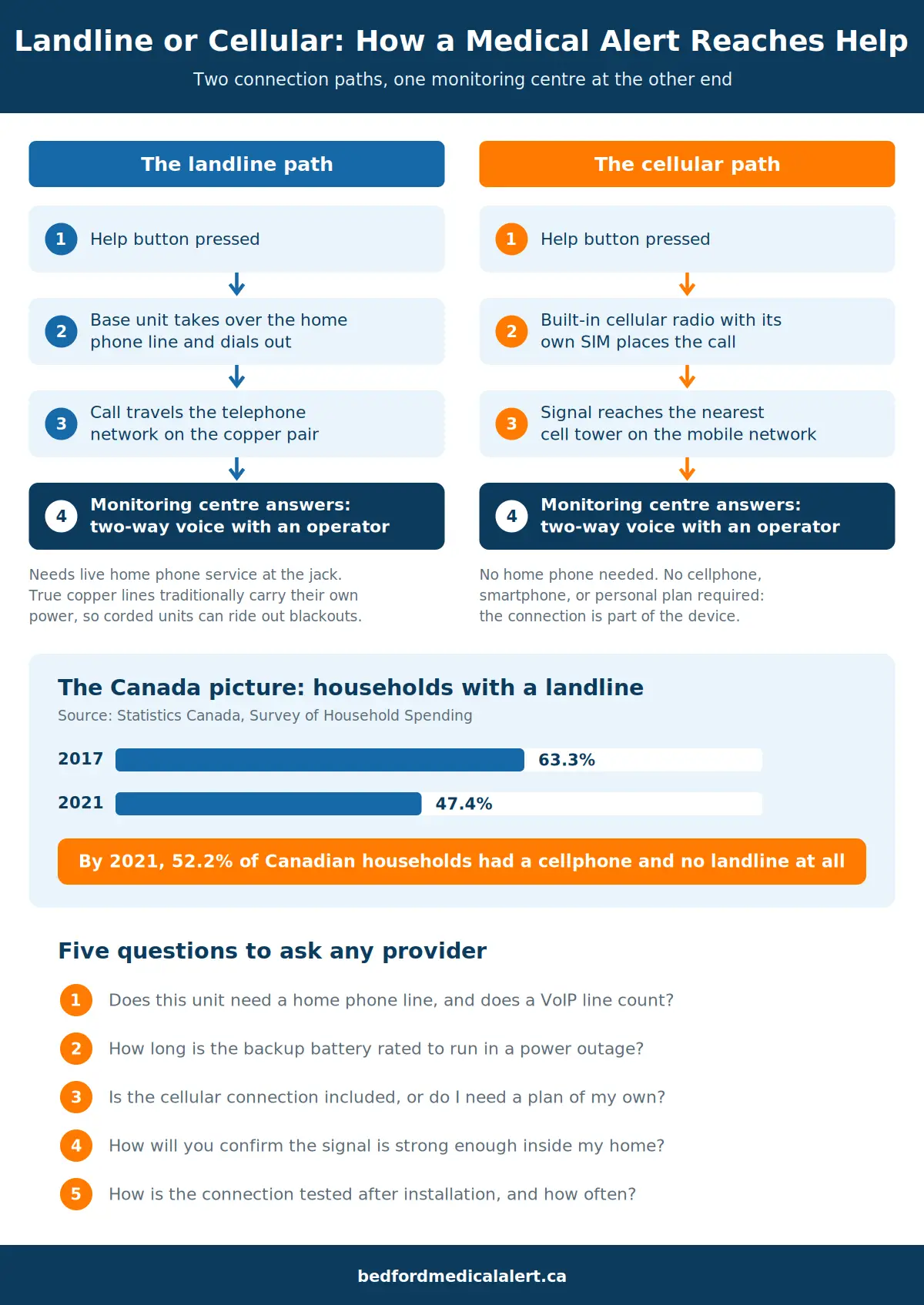
A cellular unit ignores the wall entirely. Inside the base station, or inside the wearable itself, sits a small cellular radio with its own SIM card. Press the help button and the unit places its call over the mobile network, straight to the monitoring centre, exactly as a cell phone would.
Three practical things follow. The house needs no phone service of any kind. The wearer needs no cell phone, no smartphone, and no plan of their own, because the connection is built into the device and comes as part of the service. And the call at the other end does not change: an operator answers the same way and follows the same personalized response plan whichever network carried the signal. We walk through that whole sequence in what happens when you press a medical alert button.
The shift is not a niche trend. Statistics Canada’s Survey of Household Spending found that by 2021 fewer than half of Canadian households (47.4%) still had a landline, down from 63.3% in 2017, and more than half (52.2%) had a cellphone and no landline at all. Medical alert systems followed their customers off the copper network.
One clarification before going further: a cellular medical alert is not the same thing as relying on an ordinary cellphone in a pocket. That comparison has its own page in cell phones vs Bedford medical alert devices. Where cellular coverage itself is the open question, as it is on many rural roads, our Barrie and Simcoe County page explains how we check it address by address before anything ships.
Plenty of Canadian homes have a phone that feels like a landline and is not one. If the cord from the phone ends at an internet modem or a cable box instead of a plain wall jack, the service is VoIP: voice carried over your internet connection. It keeps the familiar number and the familiar dial tone, which is why the switch often goes unnoticed for years.
The distinction matters twice. It matters on the day you order a medical alert, because an older landline-only unit plugged into a VoIP line depends on your modem staying powered and your internet staying up. And it matters during an outage, because VoIP equipment goes quiet the moment its power does, unless the installer added a backup battery.
One question to your phone or internet provider settles it: does my home phone still work when the internet is down?
Not sure what your home setup means for a medical alert? Describe your phone and internet situation to the Bedford care team at 1-888-755-3055 and a care consultant will tell you plainly what fits your address.
Ice storms and summer blackouts are where connection design gets tested. Batteries decide most of it.
Cellular base stations are generally built with an internal backup battery meant to carry the unit through an outage lasting hours. The rated figure varies by model, which is why it belongs on your question list rather than your assumptions. The mobile networks themselves keep backup power at many tower sites; a long regional blackout can strain any network, fixed or mobile, but a short one usually passes without a cellular unit noticing.
The old copper advantage is real and shrinking. It applies only to a corded phone on a true copper line, and much of Canada’s home phone service now arrives over fibre or cable, where the same battery questions apply to the equipment in your basement or utility closet.
Wearables have batteries too. A pendant sitting dead in a drawer answers nothing, so charging routines belong in the safety conversation from day one.
Whoever you are considering, Bedford included, these five questions surface everything this page covers. An established provider can answer all of them in a single phone call.
Write the answers down. The differences between providers show up here long before they show up in brochures.
Bedford is a Canadian company with 24/7 monitoring based in Canada, and the device lineup spans both sides of this page. The Go Anywhere pendant and the Go Anywhere watch are mobile devices by design: they connect over cellular networks wherever they travel, and in an emergency they use GPS along with related methods to share where you are, a process we explain in how GPS medical alert devices locate you. No home phone is involved at any stage.
Home Freedom, the in-home system, pairs a wearable help button with a base station in the house. What your particular home needs from its wiring, if anything, is confirmed during Easy Setup, and the equipment is included with the subscription rather than purchased separately. Plans typically run month-to-month after a three-month minimum at the start, with no long-term contract and no cancellation fees, so the setup conversation stays focused on your house.
If you are weighing an in-home system against a mobile one, Home Freedom vs Go Anywhere sets the two side by side. The monitoring centre behind them is the same either way, and so is the personalized response plan your family builds with us.
Bedford brings three generations of experience to these conversations and holds a 4.9-star Google rating. It is an OCSA member as well.
The wall jack stopped being the gatekeeper years ago. What helps now is a clear look at the home you actually live in: which phone service it really has, how its power behaves in storm season, and how far from the house your days usually take you. Ten minutes of checking beats any amount of guessing.
If home is where the protection needs to live, start with the Home Freedom systems page, or call a Bedford care consultant at 1-888-755-3055 and describe your setup. Equipment is included, and Easy Setup does the rest.