
There is a gap between owning a medical alert system and knowing that it works. A pendant on a bedside table looks the same whether its battery is full or flat, and whether the address on file is this house or the one the family sold two years ago. One deliberate press closes that gap.
Bedford Medical Alert® recommends testing your device. What we do not publish is a schedule, because we have not set one. If you want a rhythm that suits your household, ask us on the phone and we will work it out with you rather than print a number here that we have not decided on.
This page covers the procedure. What a test press does, what the operator does with it, what the press actually confirms, and the one thing we suggest you do not try to test.
Press your help button the way you would if something were wrong. Then say, in your first breath, that you are testing.
That opening line is the whole etiquette of a test call. It tells the operator how to read everything that follows, and it saves the operator the short stretch of working out whether you are in trouble.
From there, the operator takes over, and what they do is the reason to bother.
The operator confirms the connection by answering you. Your device reached our monitoring centre in Canada, a real person heard you, and you heard them. That is the fundamental question a medical alert system exists to answer, and there is no way to answer it from the outside by looking at the device.
The operator may also ask you a few more questions, even on a test: to confirm your address, and to ask again whether you are all right, so that they can be certain you really are. If they read your address back and it is not where you are standing, the test has already paid for itself.
A test call carries no charge and no penalty. That is not a concession we make grudgingly. We have written separately about why an accidental press costs nothing and why the fear of pressing does real harm, in why we would rather you pressed it, and that post is the better read if what you are really asking is whether you will be in trouble.
A test tends to get treated as a yes or no about the button. It is doing more work than that.
A single deliberate press confirms five separate things:
That fifth one is soft, and it is still most of why we raise testing with people at all. A voice you have already answered once, standing in your own kitchen on an ordinary morning, is an easier voice to answer the next time.
If you want to know what the same call looks like when it is not a test, we set out the emergency sequence step by step in what happens when you press a medical alert button.
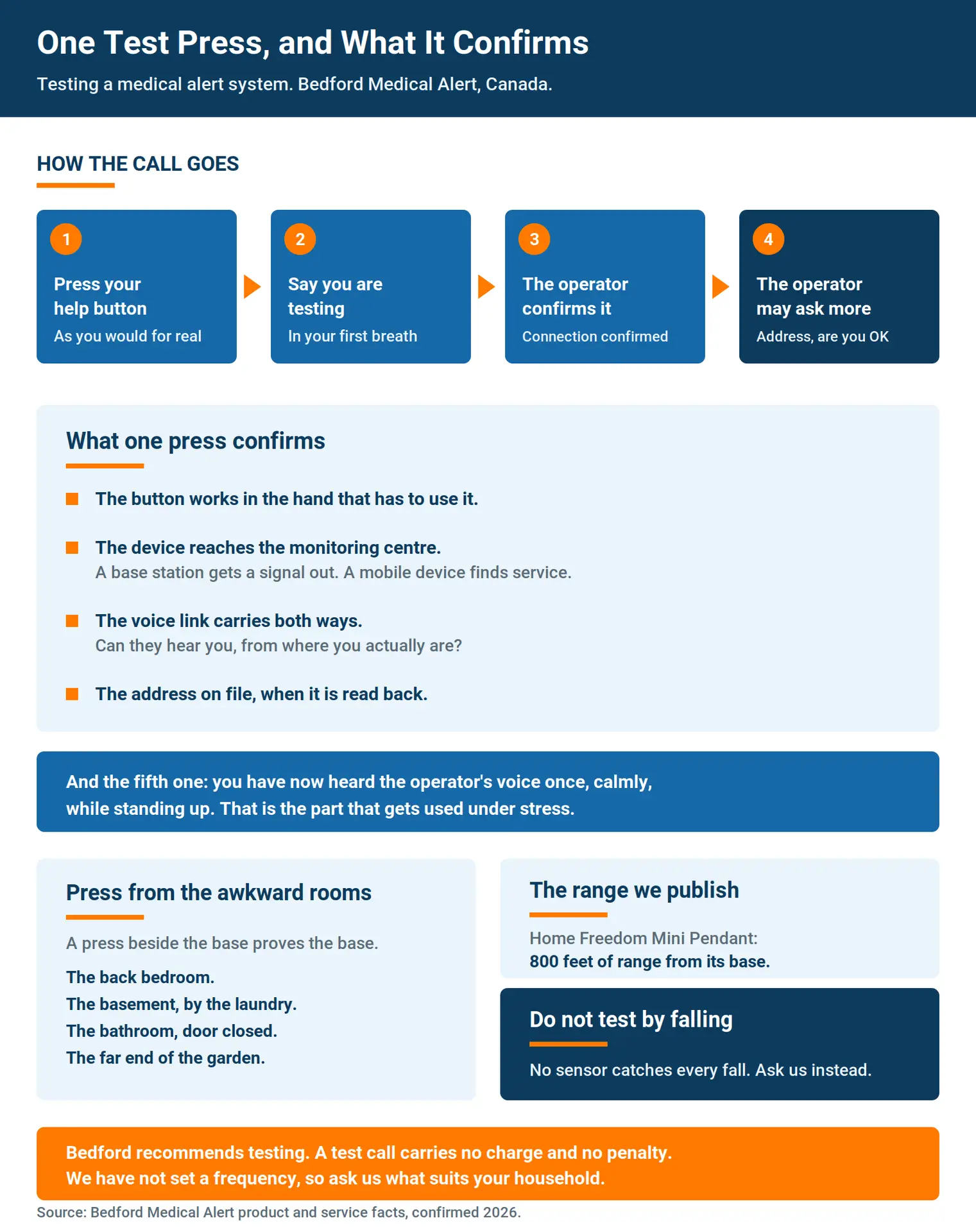
Here is the part that most test presses get wrong. They happen in the living room, three steps from the base station, in the middle of the afternoon.
That press proves the living room.
The places worth testing are the awkward ones. The back bedroom. The basement, at the bottom of the stairs, beside the laundry. The bathroom with the door closed and the fan running. The far corner of the garden in July, when the hedge is full and the house is a long way off.
Range is a real limit and we publish ours. The Home Freedom Mini Pendant is listed at 800 feet of range from its base, which comfortably covers a house and a tidy yard and does not reach a back fence line on a large property. Two way voice is the harder test. A connection can open cleanly and still leave an operator straining to hear somebody through a closed bathroom door.
Find that out on a Tuesday morning while you are standing up, rather than the other way round.
Wondering what your own device does at the far end of your home? Call us at 1-888-755-3055 and describe the place: how many floors it has, where the base station sits, and the one room you are least sure about. We will tell you what to expect from the equipment already in the house, and what a different setup would change about the answer. The call costs nothing and commits you to nothing.
Do not throw yourself down to see whether automatic fall detection notices.
We understand the impulse. Fall detection is the one feature that is meant to work without the person doing anything, and that is exactly why somebody wants proof that it will. The problem is that a deliberate fall onto a floor is a genuine injury risk for exactly the person most likely to be curious about it, and a controlled drop onto a bed or a sofa is not the event the technology is watching for anyway.
The mechanism is worth understanding in general terms before anyone decides to experiment on it, and we have written it up properly in how automatic fall detection works. For this page, the line that matters: no sensor on the market catches every fall, which is why we describe automatic detection as a second line sitting behind a button rather than something to lean on.
So test the button, which is the part you control. For anything you want to know about how the detection behaves on your particular device, ask us and we will tell you what it does and what it does not do.
Silver Shield sits outside this entirely. It is not a button anyone presses, and it is not monitored by our staff. It runs on protocols a family sets, and those protocols alert the family automatically. If a household has one, the questions about checking it are different questions, and they should come to us directly rather than be guessed at from a page about buttons.
This is a list of moments, not a schedule. We have not set a frequency and we are not going to imply one by the back door.
A press is worth doing when something has changed underneath the device:
None of these is urgent on its own. Together they cover most of the ways a system that worked in March quietly stops matching the household by October.
Sometimes it does not, and that is the point of testing.
If you can hear the operator but they cannot hear you, or the call does not go the way this page describes, get in touch. Pressing again, harder, tells you nothing new. You can reach us through the website, by phone or by email, and the phone is usually fastest, because most of what we need to ask is quicker to say than to type.
The version we would rather avoid is the quiet one. Somebody has a test that does not go as expected, decides the equipment cannot be trusted, and the pendant goes in a drawer. Nothing on this page matters if the device is in a drawer. Tell us instead, and let us find out which part went wrong.
Press the button. Say you are testing. Answer what the operator asks, and give your address if they check it. Do it from the rooms you actually use, and from the far ones. Leave the fall detection alone and ask us about that separately. If anything is off, tell us.
One short conversation, no charge, and at the end of it you know something about your own household that you did not know that morning.
Choosing a system for yourself or a parent, and want to know how it will behave in the rooms that worry you? Our Home Freedom setup puts a base station in the house and a help button on the person, with monitoring staffed around the clock here in Canada. The subscription includes the equipment, and there is no long term contract to sign and no fee for ending the service. Call 1-888-755-3055, or read what the Home Freedom systems include and then call us with the house in front of you.